


Backstory:
While at Kroger, I was able to attend AI workshops within our company – we were able to meet with both OpenAI and Adobe Firefly during these and then had breakout rooms where we would explore with different features. As someone who enjoys art direction, it’s been interesting to see how AI can be integrated as a tool.
December of 2023 I decided to play around with these features and also use it as a way to bring some joy to family and friends by using it to make pet portraits, commonly found online in many different styles. It started with creating one for my dog’s Secret Santa at her daycare and then escalated to a whole group chat of my friends requesting ones after I showed them. It surprisingly felt way more rewarding when memorial photos started coming into play, and I was so happy to provide a lighthearted uplift before the holidays.
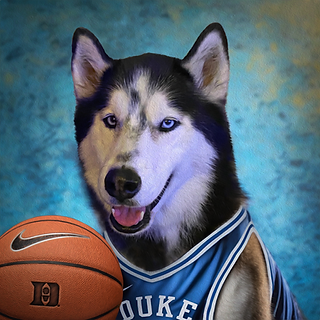
My mom ended up requesting a group portrait of our family's pets which really helped me learn how to utilize AI through trial and error. Also a request for a dog dressed like a Duke basketball player which gave some insight with AI's capabilities.
Process:
The process went by starting with the original pet portrait pulled off to the side as reference, and then I opened Adobe Firefly. We learned in our workshops how to try to get the perfect prompt for what you’re looking for and then how to finesse it further to get it as specific as possible. I tried to use key words of animal breeds closest to the reference pet so I would have as minimal photoshopping required as possible. Then I would take the AI image I landed on in photoshop, photoshop in the pet’s face and tweak/color correct it to look as believable as possible. Then finish it off with an oil painting stylization to make it more believable (because some pet photos can be a bit pixelated and blurry). For reference each pet took about a half hour to complete, the group photo of my family's pets took over ten hours.
VICTORIAN PET PORTRAITS